
Best CRM Features for Small Businesses: How to Choose
Compare CRM features by your small business workflow, from shared conversations and sales follow-up to appointments, campaigns, and reporting.
By Emily Carter · · 6 min read ·

Choosing the best CRM features for small businesses starts with the work you need the software to handle. A shop managing product enquiries has different priorities from a clinic booking appointments or a team handling customer messages across several channels. Talkty is one option that brings customer conversations, sales tracking, appointments, and other business tools together.
How to choose CRM features for your workflow
Before comparing systems, list the customer tasks your team handles repeatedly. Then prioritise features that support those tasks directly:
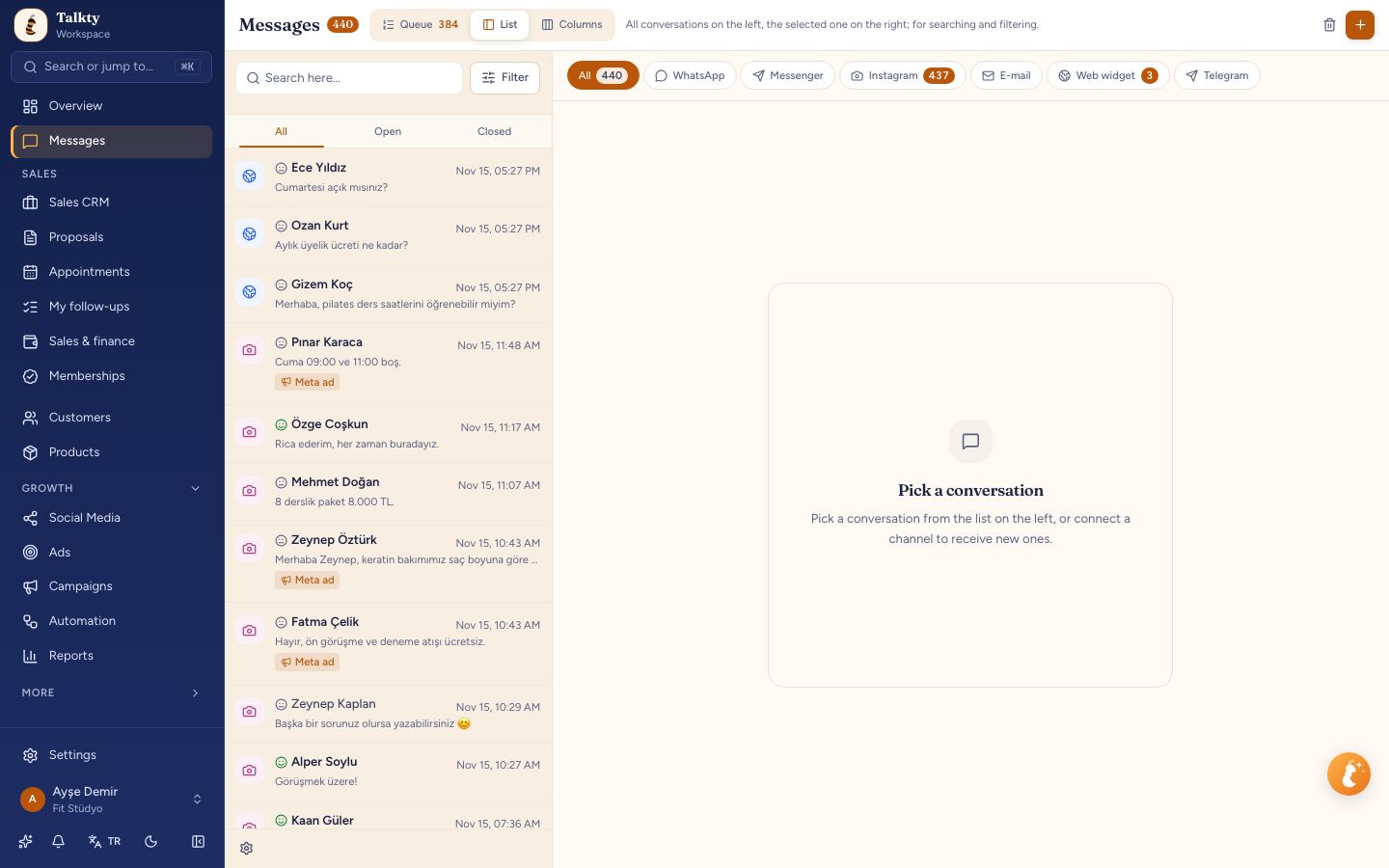
- Many incoming messages: Look for a shared inbox with conversation assignment and tags. Talkty brings WhatsApp, Instagram, Messenger, and web chat into one list.
- Leads need regular follow-up: Prioritise customer records, sales stages, reminders, and an activity history. Talkty’s Sales CRM uses drag-and-drop boards and follow-up plans.
- Customers book appointments: Look for a calendar that shows bookings and their status. Talkty puts appointments booked by your team or its AI assistant into one calendar.
- The same questions come in often: Consider an AI assistant that can answer questions using your business information and hand a conversation to your team when needed.
- You run planned outreach or social content: Compare campaign, social media, and advertising tools against the channels and workflows you actually use.
- Several people share customer work: Check whether the CRM lets you control who can see records and boards.
This approach helps you compare products by fit, rather than choosing a long feature list that may not match your daily work. Talkty’s available features depend on the plan; its plan comparison is available in the setup wizard and under subscription details.
Shared inbox for customer conversations
A shared inbox matters when customer enquiries arrive through different messaging channels. Talkty brings WhatsApp, Instagram, Messenger, and web chat conversations into one list. You can assign and tag conversations so your team can organise work and see who is handling each message.
Open the Messages screen to work with conversations. If you are comparing inbox tools, Benefits of a Shared Inbox for Small Businesses covers why a shared view can be useful for a small team.
AI assistant for common customer questions
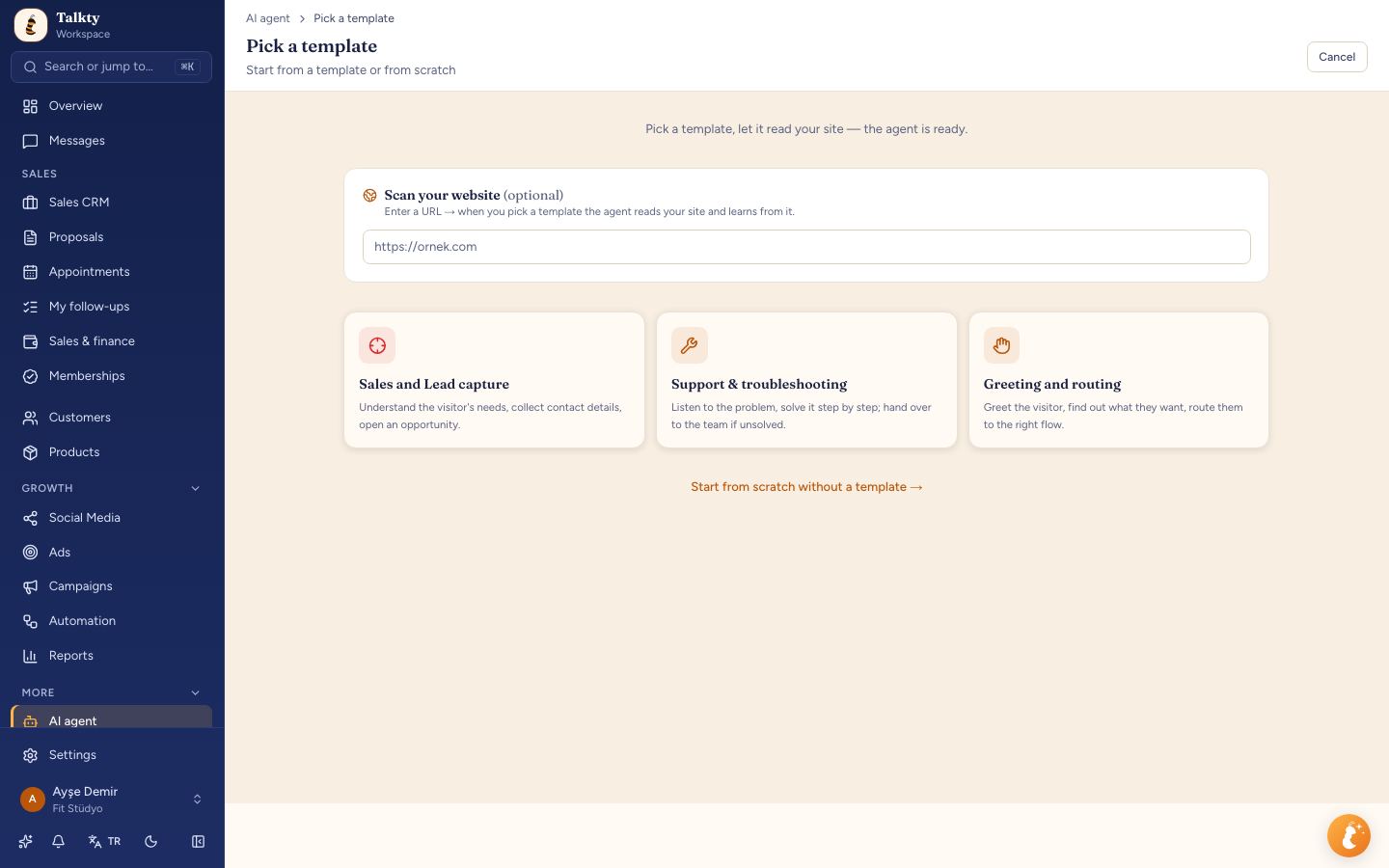
An AI assistant can help when customers ask recurring questions about prices, hours, or packages. Talkty’s assistant can answer these questions around the clock and hand the conversation over to your team when needed.
During first-day setup, entering your website prepares the assistant with information from it. You can also open the assistant page to write instructions and general details, then test it by asking a question in the test chat. The test chat does not reach customers or create records.
For more on this workflow, read Using AI for Customer Support 24/7 with Talkty.
Sales CRM for lead tracking and follow-up
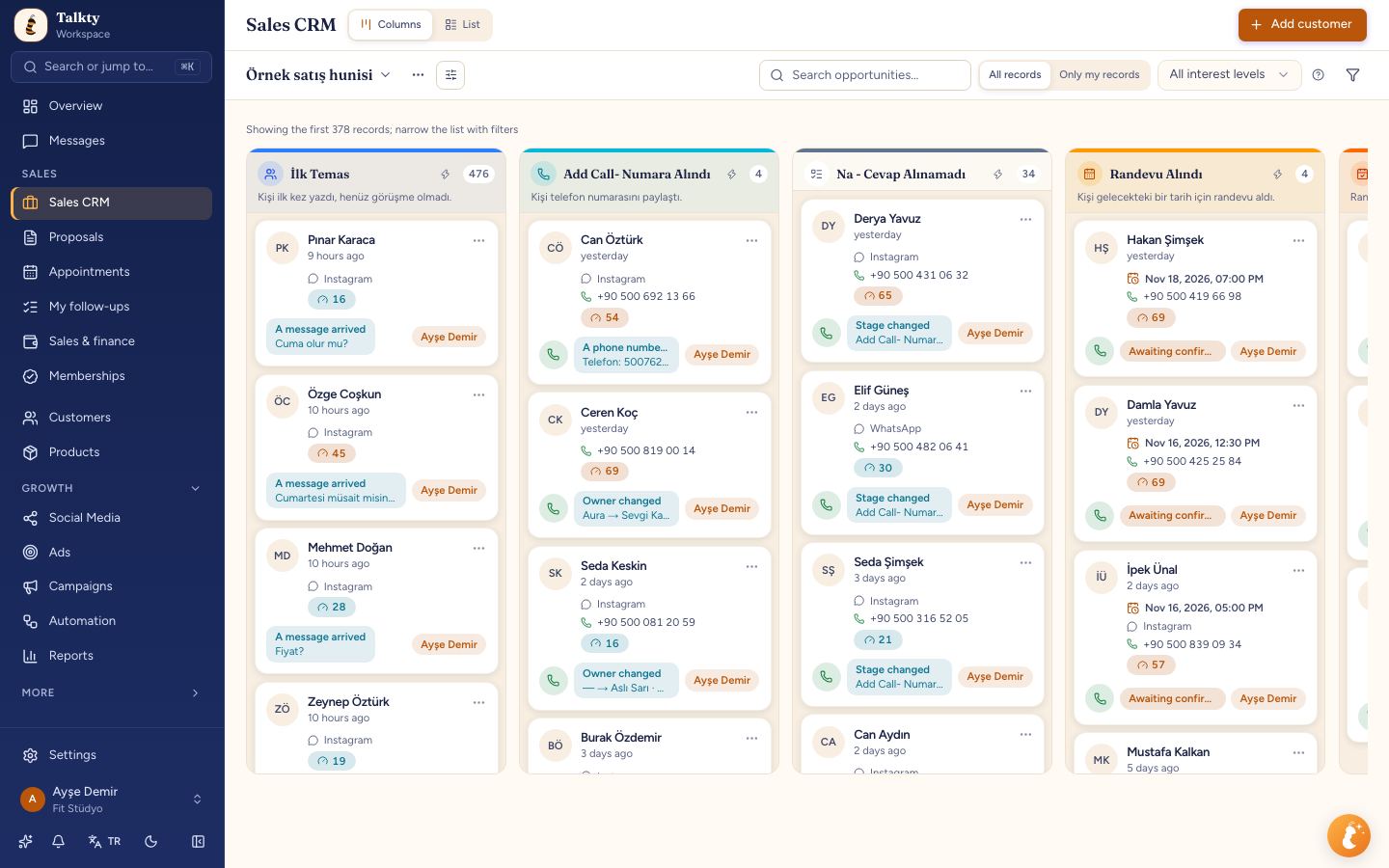
If enquiries can turn into sales over several conversations, look for a CRM that makes the next step visible. Talkty represents each customer as a card on a drag-and-drop Sales CRM board. Follow-up plans, reminders, and a dated activity history help your team keep track of progress.
The sales flow is prepared around your business type and what you sell. For example, the setup can provide different sales columns for product, project, service, or membership businesses. To begin, choose your business type and what you sell in the setup wizard; Talkty uses those choices to prepare the sales flow and relevant fields.
Appointments and calendar
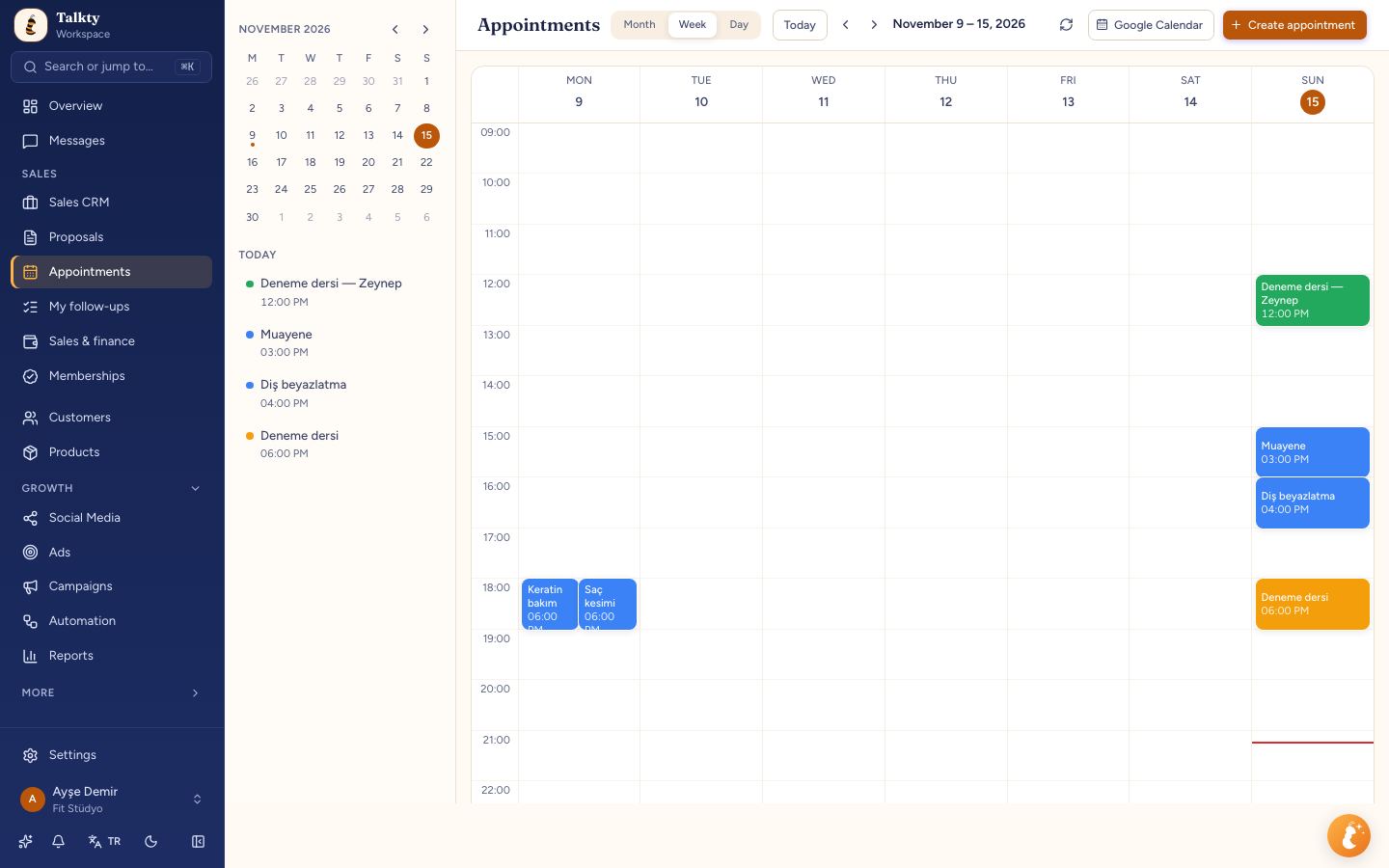
For a business that schedules customer visits or consultations, appointment handling may be more important than campaign tools. Talkty puts appointments booked by your team or its AI assistant into one calendar. The calendar includes confirmation and attendance status, as well as reminders.
This gives the team a shared place to check upcoming bookings and their status. The setup wizard also asks what you sell, including whether you offer appointments, so the account can be prepared for that workflow.
Campaigns, social media, and ads
If your team regularly contacts customer groups, Talkty Campaigns support personalised bulk messages using approved WhatsApp templates and email.
For social media, Talkty can create post images and copy with AI and your brand kit. You can approve and schedule posts on Instagram, Facebook, and YouTube, and send videos to TikTok. Instagram comment automation can send a DM to someone who comments with a keyword, reply publicly to comments, and run giveaways from comments.
Talkty also supports setting up Facebook and Instagram ads with AI help. Leads from an ad land in the CRM, and you can see how much of the spend turned into sales (ROAS). These tools are most relevant if your business already uses these channels and wants to connect outreach or ad leads with customer records.
Finance, reports, and automations
For businesses tracking payments and balances, Talkty’s finance and memberships tools show sales, payments, outstanding balances, and net collections using bank-specific instalment and commission rates.
The dashboard and reports show incoming leads, the conversion funnel, representative performance, and response times. These views can help a team review its sales and service activity.
Talkty’s visual flow builder can automate repetitive work such as welcome messages, stage changes, and notifications. Consider this feature when routine steps are taking time or need to happen consistently.
Team access and permissions
When several representatives use a CRM, check how it handles access to customer information. Talkty’s roles and permissions let you decide who sees what, including showing representatives only their own boards. This is a separate team-access task to consider after the initial account setup.
How to get started with Talkty
- Choose your business setup. In the first-day setup wizard, select your business type and what you sell. Talkty uses these choices to prepare your sales flow and relevant fields.
- Connect a messaging channel. Choose WhatsApp, Instagram, Messenger, or website chat in the channel setup. Connected channels are marked Connected. Once WhatsApp is connected, customer messages appear in Messages.
- Prepare and test the assistant. Enter your website during setup if you want the assistant prepared from it. Then open the assistant page, add instructions and general details, and ask a customer-style question in the test chat.
- Add contacts. Import a CSV file or use Open Contacts to add people one by one.
- Review team access separately. After setup, configure roles and permissions to control what team members can see.
The setup wizard guides you through the first steps and lets you skip a step or return later. For details, see Business type and ready-made setup. Subscription information is under Settings › Billing & plan › Subscription.
Summary
The best CRM features for your small business depend on your workflow. Prioritise a shared inbox for multi-channel enquiries, sales boards and reminders for lead follow-up, or a calendar for appointment-based work. Talkty is one option that combines these tools with an AI assistant, campaigns, social media and ads, finance, reporting, automations, and team permissions. Compare its features and plans with your needs before deciding.
Frequently asked questions
- How should a small business choose CRM features?
- Start with the tasks your team handles repeatedly. Prioritise a shared inbox for multi-channel messages, sales tracking and reminders for leads, a calendar for appointments, or campaign tools for planned outreach.
- Which channels does Talkty include in its shared inbox?
- Talkty brings WhatsApp, Instagram, Messenger, and web chat conversations into one list. You can assign and tag conversations.
- How is Talkty’s AI assistant prepared?
- Entering your website during first-day setup prepares the assistant with information from it. You can also add instructions and general details on the assistant page and test it in the test chat.
- Can Talkty track appointments and follow-ups?
- Yes. Its Sales CRM has customer cards, drag-and-drop boards, follow-up plans, reminders, and dated activity history. Appointments booked by the AI or your team appear in one calendar with confirmation, attendance status, and reminders.
- Does the setup wizard include team permissions?
- The first-day setup wizard covers business details, channel connection, the AI assistant, and contacts. Team roles and permissions are a separate task you can configure after setup.
Emily Carter