
How to Prevent Missed Customer Messages with Talkty
Learn how to prevent missed customer messages by organizing conversations, assigning ownership, using AI replies, and managing CRM follow-ups.
By Emily Carter · · 5 min read ·

Why customer messages get missed
When customers contact your business through different channels, conversations can be overlooked or left without a clear owner. A useful way to reduce this risk is to bring supported channels together, assign responsibility, and make follow-up work visible.
Talkty’s shared inbox brings WhatsApp, Instagram, Messenger, and web chat into one list. You can assign and tag conversations, use an AI assistant to answer questions it knows, and manage follow-ups with Sales CRM.
Keep supported channels in one shared inbox
Use Talkty’s Messages screen to work through conversations from WhatsApp, Instagram, Messenger, and web chat in one list. Instead of checking each of these channels separately, your team can see the conversations together.
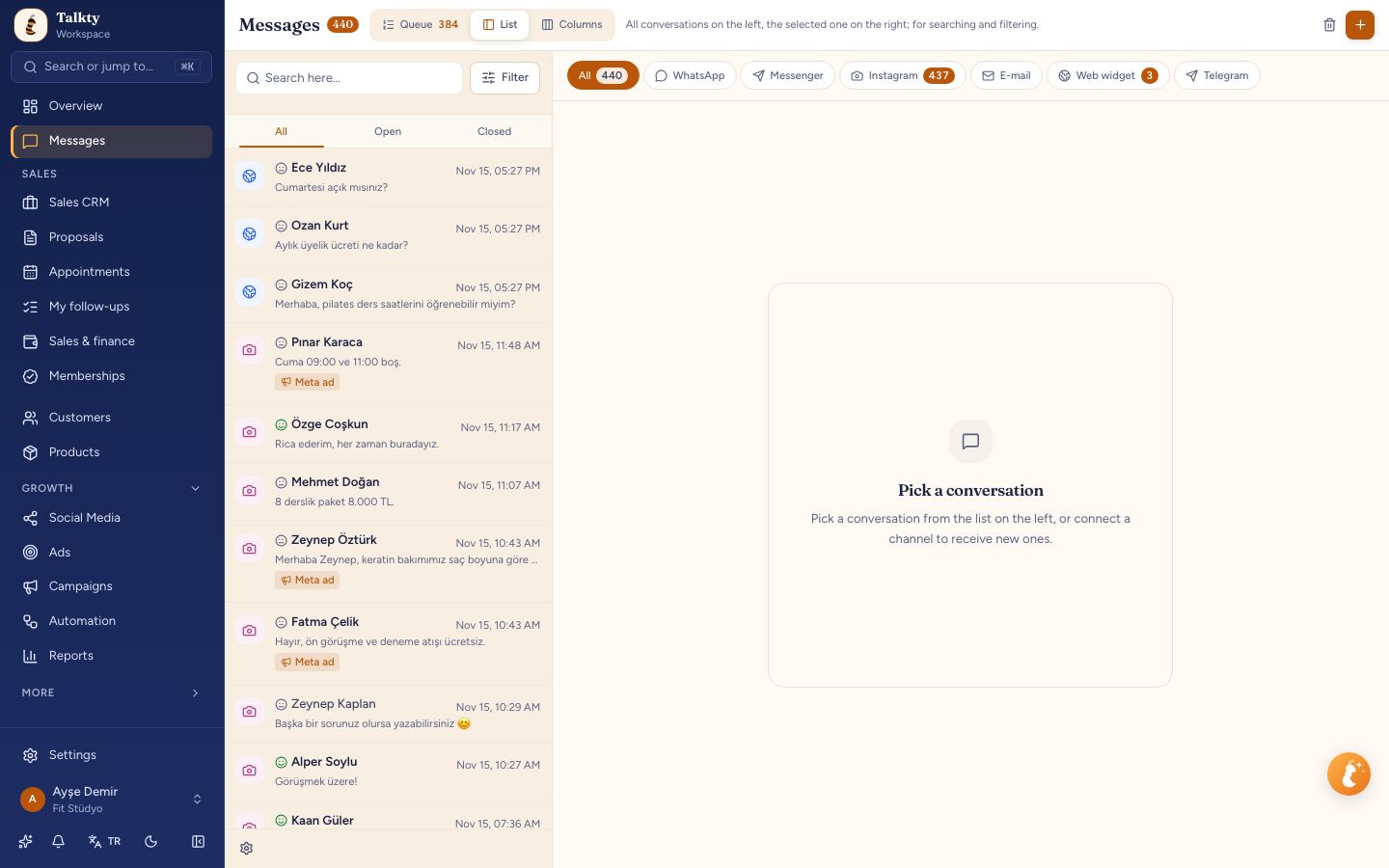
Assign each conversation to the team member responsible for the next reply. Add tags that make the topic or follow-up need easy to recognize, such as an order question or a request that needs attention. Keep the team’s tags consistent so everyone can understand them.
Assignment clarifies who should respond; tags help the team identify what a conversation is about. For more guidance, read How to Tag Messages for Team Follow-Up with Talkty and How to Manage Multiple Chats in One Inbox.
Use AI to answer common customer questions
Talkty’s AI assistant can be trained on your website and documents. It can answer questions about information such as prices, opening hours, and packages, including outside your team’s working hours. When a customer needs help from a person, the assistant can hand the conversation over to your team.
Prepare the assistant with the information you want it to use, such as relevant website content and documents. Then use it to handle the questions it can answer, while your team takes over when needed. Keep conversations assigned and visible in the shared inbox so your team can follow up on handovers.
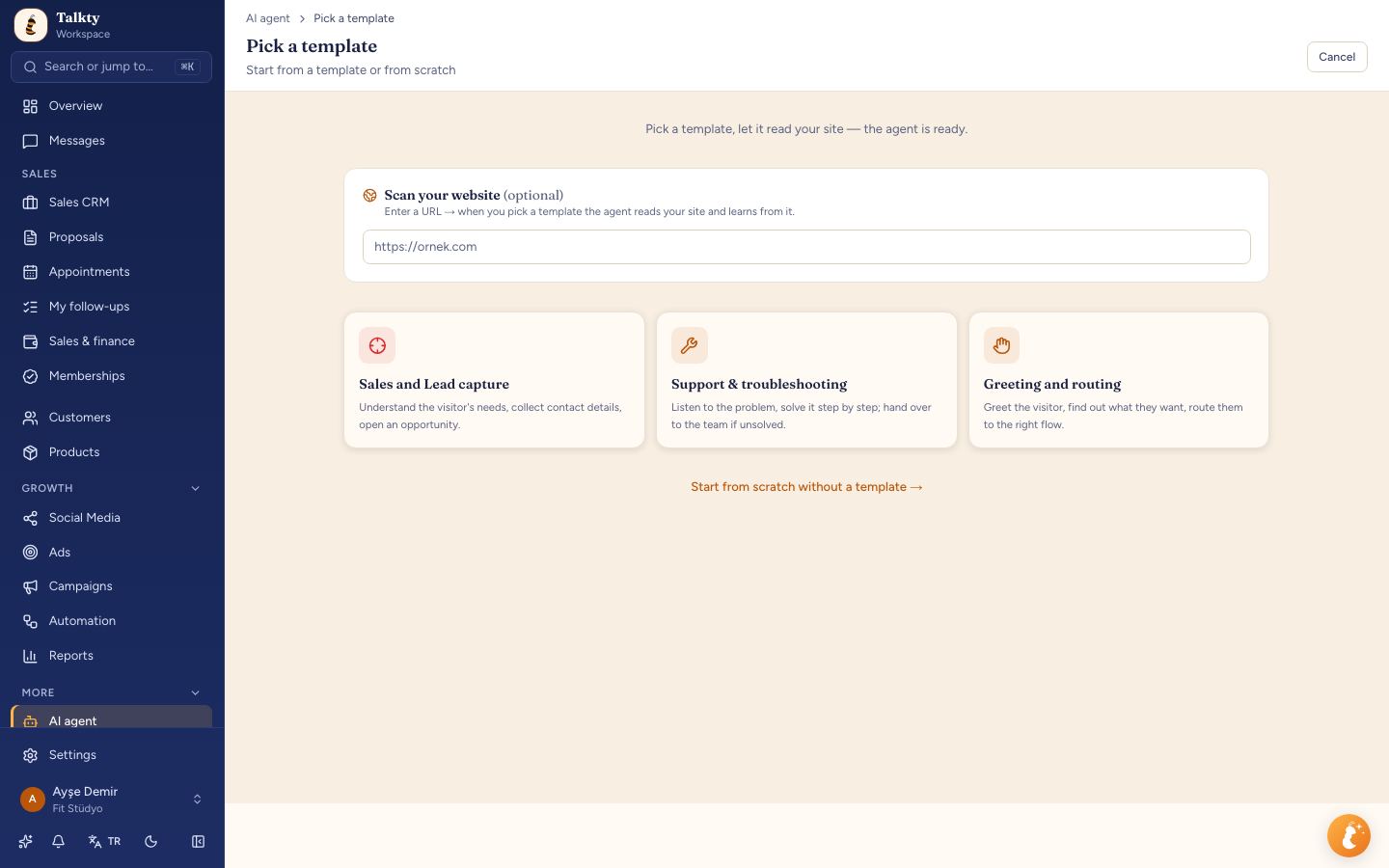
AI can help with routine questions, but clear team ownership still matters. For more practical advice, read Using AI for Customer Support 24/7: A Practical Guide.
Manage customer follow-ups with Sales CRM
A conversation may need attention after the first reply. Talkty’s Sales CRM represents each customer as a card on a drag-and-drop board. It includes follow-up plans, reminders, and a dated activity history, helping your team keep track of customer relationships and what has happened over time.
Use CRM follow-up plans and reminders to keep future actions in view. Check the dated activity history when continuing a customer conversation so you can understand the earlier interactions. This makes it easier for the team to avoid relying on memory alone.
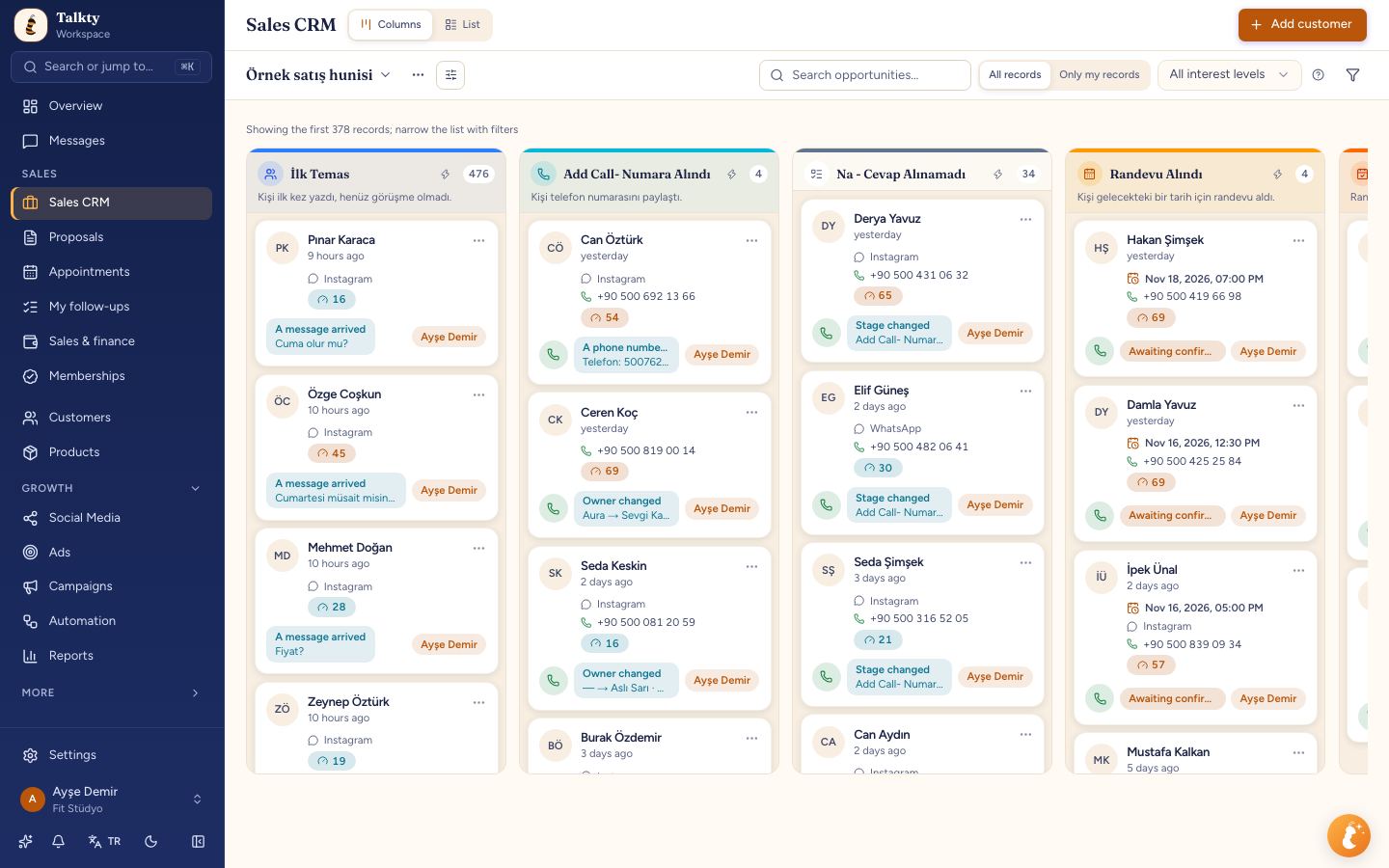
For more guidance on planning customer follow-ups, see How to Create Effective Follow-Up Plans with Talkty.
Automate suitable replies and follow-ups
Talkty automations can run when a message arrives, an opportunity changes, or a schedule is reached. Examples include sending a welcome message, notifying an advisor when an opportunity changes stage, and following up with a customer who has gone quiet.
To build a quiet-customer follow-up, use this documented flow structure:
- Open Automation from the left menu under Growth and create a flow with the Message received trigger.
- Add a Delay step for the waiting period.
- Add a Condition that checks whether Customer wrote after the flow started equals false.
- Add a Quick message on the condition’s Yes branch.
- Test the flow, check that its steps are complete and connected, then activate it.
The condition checks the conversation again after the delay. If the customer wrote in the meantime, the follow-up is not sent. For WhatsApp, free-form messages cannot be sent more than 24 hours after the customer’s last message; use an approved template for a longer delay.
Testing a flow can send real messages or change an opportunity. For a message-triggered flow, select a conversation with your own number when testing a message. For an opportunity-triggered flow, choose an opportunity knowing that the test can send messages and change it.
Ready-made automation templates include options such as appointment reminders and new-lead follow-ups. Select a suitable template, choose an approved WhatsApp template where the flow requires one, and save and activate it. If a system automation already handles a task, avoid running a second flow for the same job unless you intend both to run.
Review response activity and team access
Talkty’s dashboard and reports show incoming leads, the conversion funnel, team performance, and response times. Review these views to understand how your response process is working and where conversations may need attention.
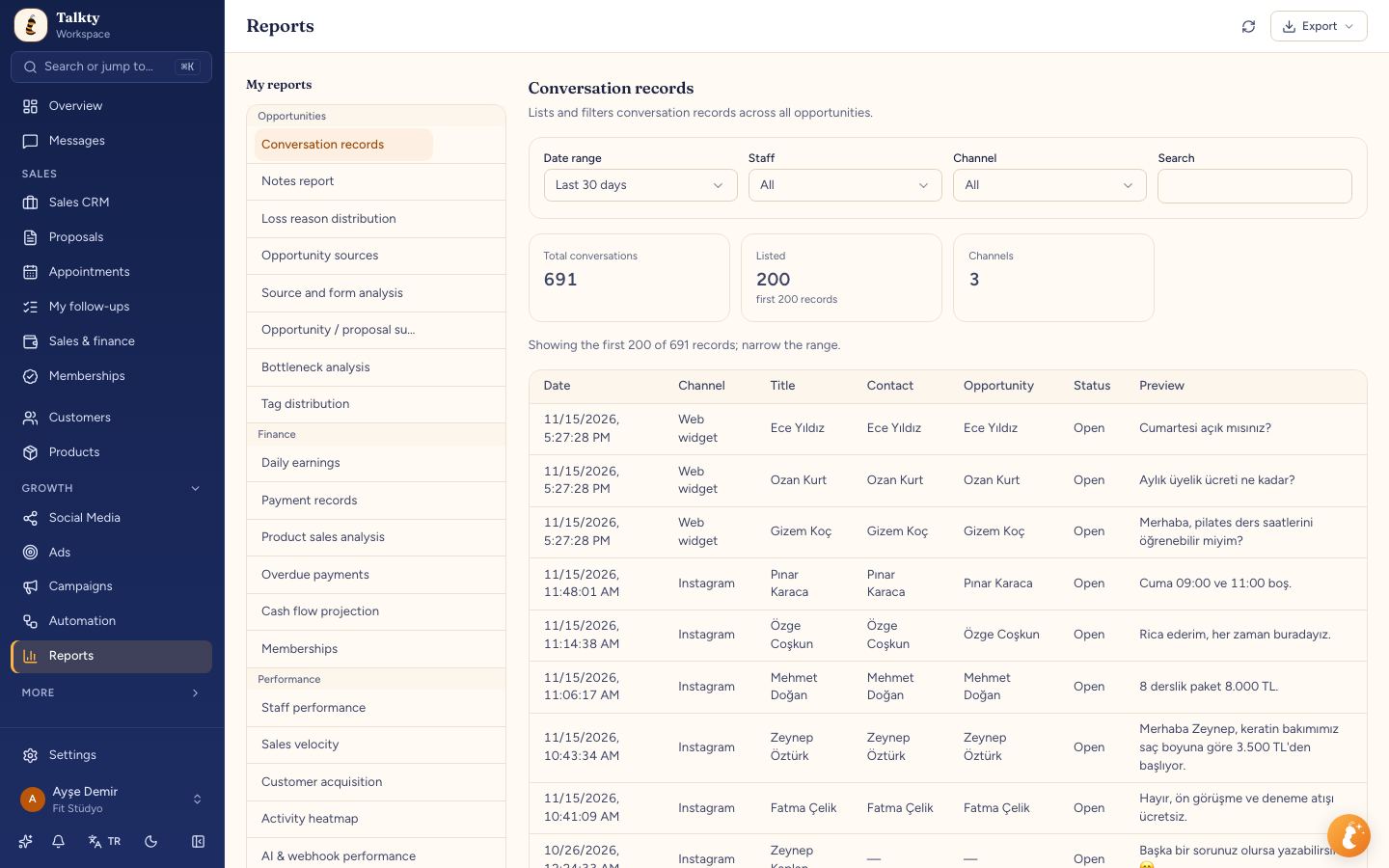
For teams, Talkty also provides roles and permissions. Set access to match each person’s responsibilities, and use conversation assignments to make ownership clear. Tags, CRM follow-up plans, and reminders can help the team keep track of what needs attention next.
A practical checklist for preventing missed messages
- Work from the shared inbox for WhatsApp, Instagram, Messenger, and web chat.
- Assign conversations to the team member responsible for responding.
- Use consistent tags to show a conversation’s topic or follow-up need.
- Use the AI assistant for questions it can answer from your website and documents, and let it hand over when a person is needed.
- Use Sales CRM follow-up plans, reminders, and dated activity history to manage ongoing customer relationships.
- Build and test automations for suitable routine messages and quiet-customer follow-ups.
- Review response times and team performance in the dashboard and reports.
Summary
To prevent missed customer messages, use the shared inbox to bring supported conversations together, assign and tag them, and keep future actions visible through Sales CRM. The AI assistant can answer relevant questions and hand conversations to your team, while automations can handle suitable reminders and follow-ups. Review response times to keep improving how your team manages conversations.
Frequently asked questions
- Which channels are listed for Talkty’s shared inbox?
- The documented shared inbox brings together WhatsApp, Instagram, Messenger, and web chat in one list.
- How do assignments and tags help a team manage messages?
- Assignments clarify who is responsible for a conversation. Tags help the team identify its topic or follow-up need.
- What can Talkty’s AI assistant answer?
- Trained on your website and documents, it can answer questions about information such as prices, opening hours, and packages, and hand conversations to your team when needed.
- How can I automate a follow-up when a customer goes quiet?
- Create a flow with a Message received trigger, add a Delay, check whether Customer wrote after the flow started equals false, and add a Quick message on the Yes branch.
- Where can I review response times?
- Talkty’s dashboard and reports include response times, incoming leads, the conversion funnel, and team performance.
Emily Carter